
Low-Cost Digital Side Hustles: Practical Ways to Start in 2026
Explore low cost digital side hustles you can test in 2026. Compare freelance work, digital goods, and reselling while managing hidden platform fees and time.
October 13, 202618 min read

What if the hardest part of working remotely isn’t learning one more app, but knowing which digital habits matter most? Digital literacy for remote work is less about advanced technology than using everyday tools to complete tasks clearly, safely, and independently. The platforms vary by role and employer, but you can assess the underlying skills through specific tasks rather than a vague label like “tech savvy.”
Remote work can spread communication, documents, calendars, and project tasks across different platforms. Unclear updates, misplaced files, or careless sharing can create avoidable confusion. You don’t need to be a programmer or IT specialist to build dependable habits, but you do need to recognize what you can do confidently and where practice may help.
This article explains the core digital tasks remote workers handle, how to distinguish foundational skills from role-specific technical requirements, and how to assess and strengthen your abilities. It also covers practical ways to adapt as work processes change, so you can build safer, clearer routines around the tasks your role actually requires.
Digital literacy for remote work is the ability to use digital tools and information safely and effectively to complete work tasks, communicate, and solve routine problems. It means understanding what a tool is for, choosing an appropriate action, and checking the result. It doesn’t mean memorizing every platform or technical term. The broader concept of digital literacy includes finding, evaluating, creating, and communicating information with digital technologies.
These abilities often come together in a single task. You might read a project request, locate the correct document, share it with the intended colleague, choose suitable access permissions, and write a note explaining what needs review. If the link fails or the file seems outdated, you need to check the source and decide on a safe next step. The apps differ between workplaces, but the judgment involved transfers.
Routine digital competence is useful across many remote roles, while advanced technical skills depend on the work. A worker may need to share a document with the right people and grant view or edit access, not build the software used to create it. Coding, design, and data analysis are valuable specializations when a role calls for them, but they aren’t prerequisites for every remote job. Focus on the tasks required for a particular position, since employer tools and expectations vary.
This distinction prevents two common mistakes: assuming remote work requires expert-level technical knowledge, or assuming basic familiarity with a device is enough for every role. You can be comfortable with everyday tools and still need role-specific training. Likewise, technical expertise doesn’t replace clear communication or careful handling of shared information.
Online workflows depend on information moving between people and systems. A clear status update helps colleagues understand what’s complete and what remains. Organized files make it easier to identify the version intended for review. These habits can reduce avoidable confusion, though they can’t prevent every workflow problem.
Judgment matters when small decisions affect access or accuracy. Before opening a work link, consider whether it fits the context and came through an expected channel. Before sharing a file, check its contents, recipient list, and permissions. When relying on online information, identify its source and consider whether it’s relevant to the task. These steps help keep everyday work clear and appropriately controlled.
These are practical habits, not signs of advanced IT expertise. A useful measure is whether you can complete the task accurately, tell others what they need to know, and recognize when to pause or seek guidance.
Digital literacy for remote work shows up in observable tasks, not just general confidence with technology. A worker may write a concise update, locate the right file, check who can access it, and resolve a routine software issue. The exact tools and expectations vary by employer, role, and accessibility needs. One team may rely on written updates, while another uses live meetings or assistive technology as part of its workflow.
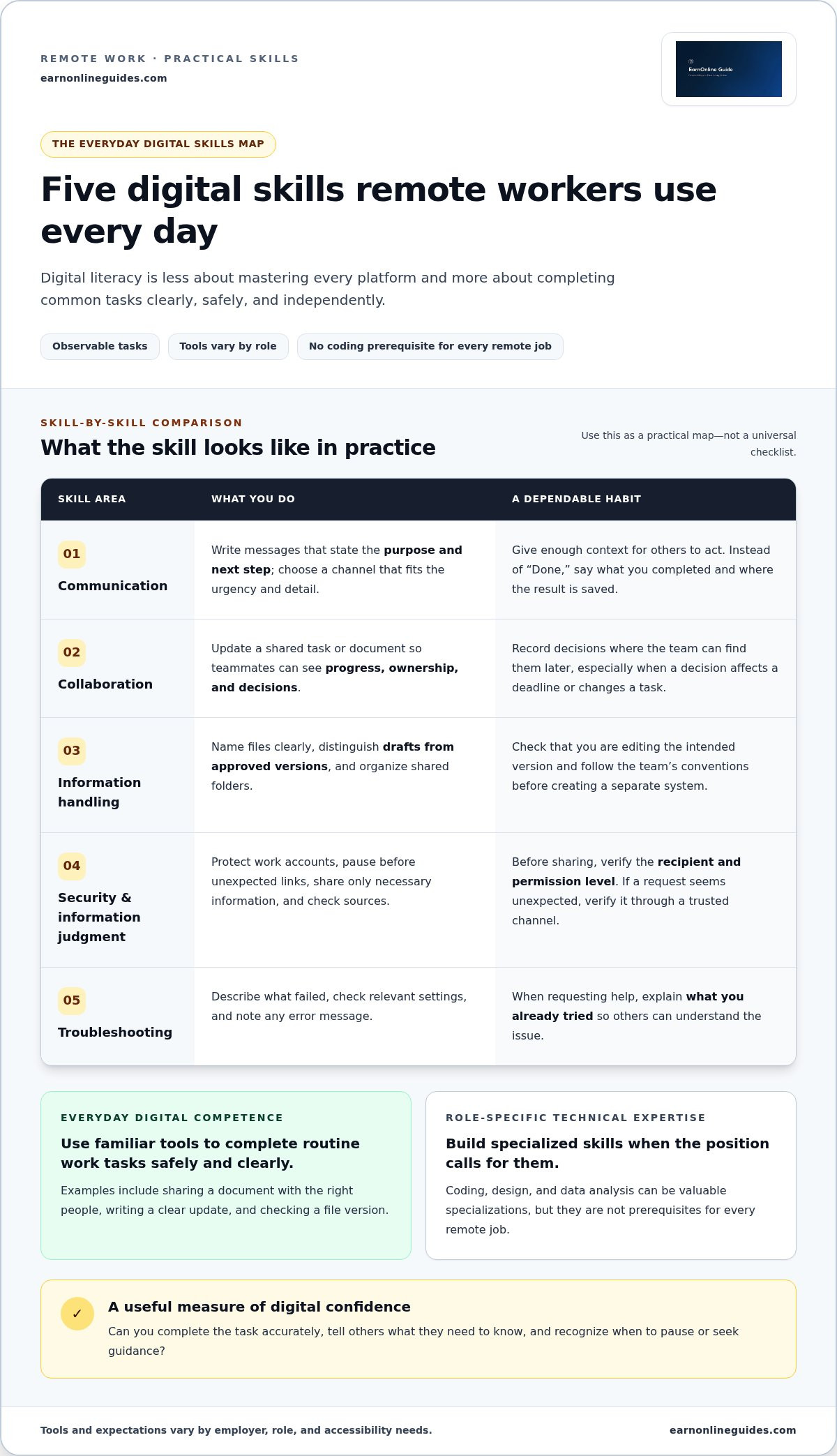
Use these skill areas as a practical map, not a universal checklist:
Clear digital communication gives others enough context to act. Instead of sending “Done,” say what you completed and where the result is saved. Use the channel your team expects for that type of update. If a decision affects a deadline or changes a task, record it where people can find it later. That written record can help teammates who aren’t online at the same time.
For file management, use consistent names, check that you’re editing the intended version, and avoid creating extra copies when a shared document is the team’s source of truth. Follow the team’s conventions before creating your own system. The right workflow depends on the employer’s software and accessibility practices.
Before sharing a file, verify the recipient and permission level. If a link or request seems unexpected, pause and verify it through a trusted channel rather than relying on its appearance. When reviewing online information, distinguish what the source directly supports from your interpretation or an unverified assumption. The U.S. government’s digital literacy assessment and learning resources can help readers find ways to develop these capabilities.
If a tool stops working, identify the specific problem, check relevant settings, note any error message, and describe the steps you’ve already tried when escalating. To compare your abilities across broader skill areas, use the Digital Skills Matrix as a starting point for choosing what to practice next.
No, remote work doesn’t automatically require coding or advanced technical expertise. The technical depth depends on the role. Foundational digital literacy helps workers communicate, manage information, and use workplace tools responsibly. Specialized skills are necessary when they’re part of the actual work, such as writing scripts, building software, or analyzing data.
Neither level is universally more valuable. Broad familiarity helps you adapt across common digital tasks, while deeper expertise supports specific responsibilities. The core digital literacy skills needed for a role may overlap with specialized technical requirements, but the two aren’t interchangeable. Someone who can collaborate on a document may still need training to automate a process with code. A software developer may still need clear written communication to explain a change to teammates.
Foundational skills include using shared documents, organizing files, communicating through workplace channels, and checking access before sharing information. A specialized task might require scripting to automate a repeated process or design software to produce a specific deliverable. Learn a role-specific tool when it supports work the role actually requires. Start with the work, then identify the technical skill that supports it.
For a wider view of skills to evaluate, review the site’s Digital Skills Matrix. Use it to explore possible areas for development, not as a checklist of skills every remote worker needs.
Read job descriptions for evidence of the work’s actual technical depth. Look for repeated tasks, named software, and responsibilities that involve building, configuring, or analyzing something. Then sort the requirements into three groups:
This distinction helps you focus your preparation without assuming every listed platform is a universal standard. Employers use different software, processes, and onboarding approaches, even for similar roles. If a description is unclear, use the listed responsibilities to judge whether a tool is central to the work or one way the employer currently completes it. Build broad foundations first, then deepen the skills connected to your target role.
Assess your abilities by what you can do, not by whether you consider yourself “tech savvy.” A task-based review shows which routines feel dependable and where practice could help. Treat the results as a personal learning plan, not a formal qualification or a judgment of your readiness for every job.
List the online tasks you expect to handle, then rate your confidence in completing each one independently. Use a simple scale such as “comfortable,” “need occasional help,” or “need practice.” Focus on demonstrated actions, including whether you can:
Note where you hesitate, repeat steps, or need someone else to complete the task. That friction is more useful to track than a broad label like “good with computers.” It can also help you distinguish a skill gap from a workplace-specific process you haven’t been shown.
Choose one recurring task that causes confusion and set a visible goal. For example: “I can create a sample document, share it with the intended viewer, and verify that the access setting is correct.” Practice with a low-risk sample file or message, not confidential work information. Use the software’s official help documentation or an accessible practice environment if one is available.
After practicing, try the task again without following each instruction. Record what works and what remains unclear. If the difficulty depends on a company process, accessibility setting, or role-specific tool, note the question to raise during onboarding or with the appropriate support channel. Review your task list as your responsibilities change. You don’t need to learn every platform at once.
For a gradual next step, explore beginner digital skills guides and choose a topic that matches a task you want to practice.
Digital literacy for remote work develops through repeated use, reflection, and adjustment as tasks change. The goal isn’t to master every new platform. It’s to notice when a workflow changes, learn the relevant steps, and make the process reliable without relying on memory alone.
A short personal reference can make routine tasks easier to repeat. Record the sequence for recurring work, such as preparing a document for review or joining a team meeting. Keep notes private and appropriate for your workplace. Don’t include passwords, sensitive work information, or details your employer requires you to store elsewhere.
When a familiar tool or process changes, identify what’s different and which tasks or access settings are affected. Use the platform’s official help materials for instructions, since older tutorials may describe a previous interface or workflow. After confirming the new steps, update your reference notes and remove outdated instructions so they don’t cause confusion.
If a change affects access to work files, account security, or confidential information, pause before experimenting. Follow workplace guidance or ask the appropriate support contact rather than guessing at permissions or using an unapproved workaround.
Prioritize skills connected to recurring tasks, current responsibilities, or clear requirements for a role you’re pursuing. Pick one small practice goal, then review whether you can complete the task more reliably. There’s no need to set an arbitrary deadline or learn tools unrelated to your work.
For example, if updating a shared project document is a regular responsibility, practice locating the correct file, making an update, and following the team’s review process. If the difficulty involves company-specific permissions, security expectations, or specialized software, seek workplace guidance. Those procedures can’t always be inferred from general digital skills advice.
Consistent, task-based practice is a practical way to maintain and extend your abilities as work evolves. To explore a structured next step, browse the digital skills learning paths and focus on areas that fit your work needs.
Digital literacy for remote work isn’t about knowing every platform or mastering advanced technology. It’s the practical ability to communicate clearly, handle information carefully, protect work accounts, and work through everyday digital problems. The right skill level depends on your role, so assess specific tasks rather than judging yourself by a broad label like “tech savvy.”
Start with one task that causes friction. Practice it in a low-risk setting, note what works, and revisit your process when tools or responsibilities change. A steady, task-based approach helps you recognize strengths and choose a useful next skill without trying to learn everything at once.
Take the next step with EarnOnlineGuides’ digital skills learning paths, then use the Digital Skills Matrix and beginner-friendly guides to choose a practical skill to practice.
Describe the work you can perform rather than using a broad label such as “computer skills.” Name the task, the tool category involved, and the outcome you supported, as long as those details are accurate. For example, you might describe organizing shared project files or preparing recurring reports. Don’t claim proficiency with software or responsibilities you haven’t actually handled.
Compare the software’s stated purpose with tools or workflows you already know. If the role requires a specific technical capability, experience with a different platform may not be a substitute. If the tool supports a familiar task, some experience may transfer. Read the responsibilities closely, then be transparent about your experience in an application or interview. Don’t present basic familiarity as professional expertise.
Clarify where the team stores approved work files, how it records decisions, which channel it uses for different kinds of communication, and where to get help with access or technical problems. These details can differ even when teams use similar software. Write down the agreed process so you can follow the organization’s workflow instead of relying on assumptions or creating a separate system others can’t follow.
Accessibility needs can influence which features, formats, or communication methods make a workflow usable. For example, a worker may rely on captions, keyboard navigation, screen-reader-compatible documents, or written follow-up after a meeting. The appropriate setup depends on the person, task, and available workplace tools. If a process creates a barrier, identify the specific step and discuss a workable adjustment through the appropriate workplace channel.
Use the accounts, devices, and storage locations your workplace designates for work. Avoid moving work files into personal email or cloud storage for convenience. Separate accounts make it easier to follow the organization’s access and information-handling practices. If you’re unsure where a file belongs or which account to use, pause and consult workplace guidance rather than making a copy in an unapproved location.
Check who published it, when it was updated, and whether its instructions match the software version or interface you’re using. For steps involving account access, sharing permissions, or security settings, prioritize the platform’s official help materials or your employer’s documentation. If a tutorial conflicts with workplace instructions, follow the workplace process and seek clarification. A popular tutorial isn’t necessarily relevant to your organization’s setup.

Article by
EarnOnlineGuides Editorial Team
The EarnOnlineGuides Editorial Team creates practical, research-driven educational content about making money online, remote work, freelancing, side hustles, digital skills, AI tools, online business, and self-employment. Our goal is to help readers understand their options, compare realistic opportunities, avoid misleading claims, and make better-informed decisions. We prioritize accuracy, transparency, practical guidance, and responsible reporting, and we regularly review our content to keep it useful and up to date.
The information provided in this article is for general educational and informational purposes only and should not be considered financial, investment, tax, legal, or professional advice. Earnings, income examples, costs, fees, and other figures may vary and are not guaranteed. Always conduct your own research and consult a qualified professional when appropriate.
Some articles on EarnOnlineGuides may contain affiliate links. If you click a link and make a purchase or sign up for a service, we may receive a commission at no additional cost to you. This does not influence our editorial standards or recommendations.
We strive to keep our information accurate and up to date, but products, services, fees, policies, laws, and market conditions can change. Please verify important information directly with the relevant provider before making financial or business decisions.
Educational information only. This article is not financial, tax, or legal advice. Platform fees and policies change; always confirm current rates in the marketplace's official fee documentation before making decisions.
Explore low cost digital side hustles you can test in 2026. Compare freelance work, digital goods, and reselling while managing hidden platform fees and time.

Learn how to open a freelance business bank account step by step. Explore document checklists, compare bank options, and keep business finances organized.

Learn how to write affiliate product reviews readers can trust. Discover a practical process for honest testing, balanced pros and cons, and clear disclosures.